Yellowbox Smart Locker System

Flexible locker access, managed in one place.

The Yellowbox Smart Locker System fits new or existing lockers, and staff can open them using an existing access card, a PIN, their phone or Microsoft Teams. They can book a locker before they arrive, and your facilities team  sees every locker from one dashboard. Europlan is the only New Zealand dealer of Yellowbox, and our own team installs it. Request a quote or call 0800 43 45 46.  See them in our Auckland, Wellington and Christchurch showrooms.

Description

The hidden cost of key and code lockers.

Key locks and digital code locks both rely on someone handing out, resetting and replacing keys or codes.

  • Hours of manual work: issuing keys and codes, replacing lost ones, and handling joiners and leavers every week.
  • Locked out, again: staff ask facilities for help about 4.3 times a year because they’ve forgotten a key, card or code (Yellowbox data).
  • Lockers nobody uses: locker numbers match headcount, not actual need.
  • No visibility: no record of who opened which locker, or when.
Resources
Dimensions
Key Pad
65H x 65W x 13D mm
Body
80H x 80W x 27D mm
Striker
37H x 80W x 21D mm
Warranty
  • 10 Year Warranty
Features
  • Access: RFID card or fob, PIN, app, Microsoft Teams and Outlook, Apple and Google Wallet, optional touchscreen for a guided user experience
  • Wireless Smart Lock – easy to install or retrofit 
  • Fits: New or existing lockers and cabinets
  • Locker modes: Permanent, day, team, shared, PIN, parcel, IT exchange
  • Microsoft Teams integration 
  • Seamless & simple to use app
  • Analytics Dashboard for automation & analytics 
  • Kiosk: 10-inch touchscreen with RFID reader
  • No onsite servers nor network connection required
  • Real Time Management App for visibility & control 
  • Integrations for a seamless experience 
FAQs

Can Yellowbox go on our existing lockers?

Yes. The locks fit most existing lockers and cabinets.

Will it work with our access cards?

It works with existing RFID cards and fobs. Tell us your system and we’ll confirm.

Does it need power or a network?

Wireless locks need no onsite server or network. The wired option means no batteries.

Who installs it?

Our own team installs and sets up Yellowbox.

How do we get a price?

Request a quote with the number of lockers and staff, or call 0800 43 45 46.

Yellowbox Staff Usage Mobile Access

How staff use it

  • Book from your phone, Outlook or Teams before you arrive
  • Pick the bay on a floor plan, then the door
  • Tap your access card and your locker opens
  • Or use a PIN, the app, or Apple or Google Wallet
  • Saved preferences make the next booking quicker
  • A reminder arrives before a day booking ends
  • 24/7 in-app support
Digital Lockers Management Dashboard Laptop

How facilities teams manage it

  • No keys or codes to hand out, collect or replace
  • Joiners get a locker and a branded welcome email; leavers’ lockers go back to the pool automatically
  • A live map shows which lockers are free, booked, overstayed or abandoned
  • Lockers left unopened are flagged, and automatic emails do the chasing
  • Team managers or EAs can manage their own team’s lockers
  • A full log of every booking and unlock, exportable for any date range
  • Lockers keep opening if the network drops, because credentials are cached on site
Yellowbox Locker Management System Ipad

Fewer lockers for the same team

Yellowbox data shows about 54% of staff need a locker every week, so workplaces using smart lockers need 30 to 40% fewer lockers for the same headcount. Lockers can be set as permanent, day, team, shared, parcel or IT exchange lockers, and changed as your needs change. We’ll help you work out how many you need when we plan your fitout.

Request a quote
products yellowbox smart lock clearcut

Fits the lockers and systems you already have

Smart lockers have an electronic lock on each door, wireless or wired, connected to a kiosk and software. Yellowbox locks fit Europlan Proceed Lockers and PSU Lockers, or the lockers you already have. Staff use their existing access cards and fobs, and Yellowbox connects to your access control system, Microsoft Teams, Outlook and Entra ID, so people are added and removed with no extra admin.

Explore our locker solutions here. 

Request a quote
Integrated Custom Digital Storage NZ
Government Agency Christchurch
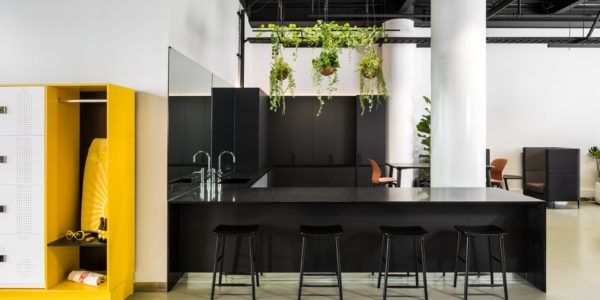
We supplied and installed PSU Lockers fitted with the Yellowbox Smart Locker System across two floors of a new office for a New Zealand government agency. The lockers are set into custom joinery and provide easy, reliable storage solutions for staff and management.
Trusted by leading New Zealand brands
IHG Logo
Google Logo
Gartner Logo
Canon Logo
Nike Logo
Ricoh Logo
BHP Logo
Zurich Logo

See how Yellowbox works

Introduction to Smart Locker Systems for Workplaces

Need help planning your space?

Let us work with you to design an inspiring workspace that performs now and into the future.
We’ve worked with a number of Europlan’s competitors and none of them measure up on service or value for money. Europlan is the benchmark we now measure all other firms by.
Debbie Rihari
Health NZ | Project Manager
We now have a beautiful environment to continue to build the business towards our goals of ridding the world of half a billion bottles by 2030. Thank you to all who had a hand in building us such a wonderful new HQ!
Brianne West
Founder, Ethique
Hospital Bean Bag Breakout Furniture
Ethique Office Auckland Kitchen Furniture
Request a quote
Place an order
products yellowbox smart lock clearcut
Yellowbox Smart Locker System
Flexible locker access, managed in one place.
Send an enquiry
Workplace Design Enquiry
0
Your Cart
This cart is empty, Inspiration awaits you— A fresh new workspace. - anonymous Shop Now
Added to cart Cart updated
Ask us a question
Send your message using the form below, and we'll be in touch soon.